Only the workspace owner can upgrade. If you later cancel, your paid plan stays active until the end of the period you paid for, then moves to Free.

Choose a plan

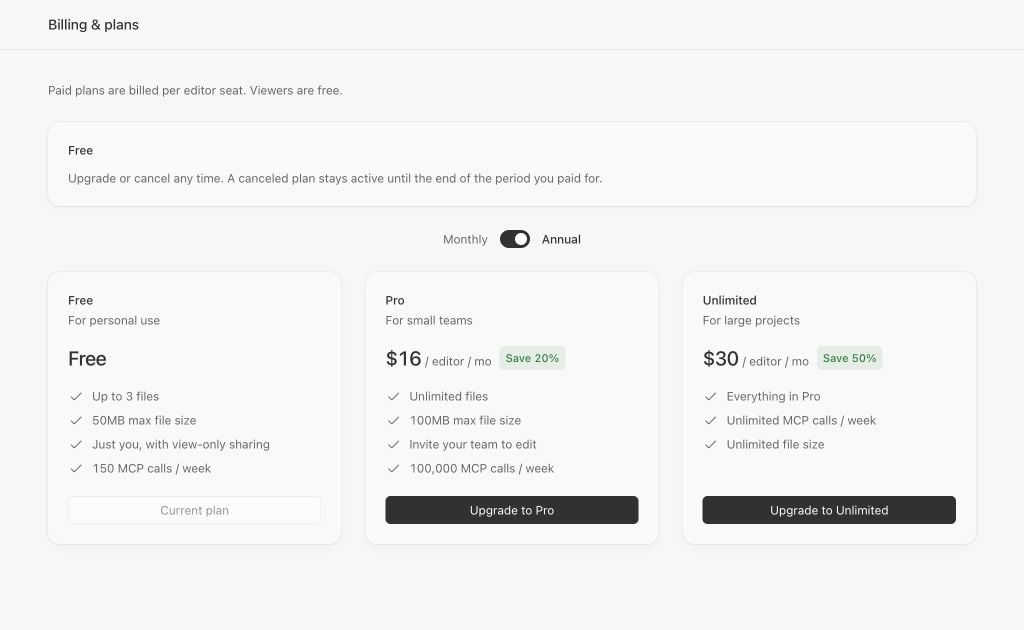
Lunagraph Billing and plans on Free, with the current-plan summary and upgrade choices.

Example Free workspace.

  1. Select your workspace and open Settings → Billing.
  2. Review the plan cards and choose Monthly or Annual.
  3. Choose Upgrade to on the plan you want.
  4. In your browser, review the plan, seats, amount, and billing interval before confirming payment.
Existing paid subscribers may see Stripe’s billing portal instead of a new checkout.

After payment

Return to Billing for the same workspace and check the current-plan summary. If checkout doesn’t open, your plan doesn’t update, or you have a question about a charge, contact support. Include the workspace name and any error text, without payment card details. See Free and paid plans for the controls available before and after upgrading.