Your paid plan stays active until the end of the period you paid for, then moves to Free. Only the workspace owner can cancel.

Schedule cancellation
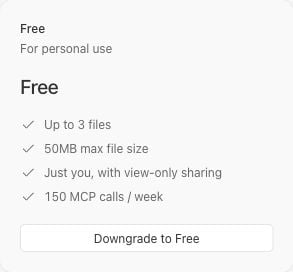
The Free plan card showing the Downgrade to Free button for a paid workspace.

On a paid workspace, choose Downgrade to Free on the Free plan card.

  1. Select your paid workspace and open Settings → Billing.
  2. On the Free plan card, choose Downgrade to Free.
  3. Complete the cancellation flow in your browser.
  4. Return to Billing for the same workspace to check the result.

A scheduled cancellation shows Canceled in the summary and Moves to Free at period end on the Free card. When available, the summary shows Active until [date], then moves to Free.
Billing summary showing Canceled, the date the workspace moves to Free, and Don't cancel.

Example of a scheduled cancellation. The paid plan remains active until the displayed end date.

A Free workspace without a subscription has nothing to cancel and doesn’t show Downgrade to Free.

Keep your paid plan

Before the paid period ends, the owner can choose Don’t cancel in the summary. Check that the pending cancellation has been removed. If the flow fails or the summary doesn’t update, contact support. Canceling Lunagraph doesn’t cancel subscriptions with an external agent provider. Manage those with the provider.